Sunday, February 25, 2018

clmempatterns: Benchmarking GPU memory access strides

Typically, streaming memory loads on GPUs are applied sequentially by the programmer by assigning sequential threads to sequential addresses in order to enforce coalescing. On the other hand, CPUs tend to favor sequentially accessed addresses by each individual thread in order to increase the degree of spatial locality and make better use of cache. Are there any intermediate patterns between these two extreme cases? How would a CPU or GPU device behave under an intermediate situation?

Here is where oclmempatterns benchmark tool comes into play. This benchmark leverages OpenCL to explore the memory performance under different access stride selections. Accessing a memory space is benchmarked by applying all possible access strides that are integer powers of 2, till the amount of total threads is reached. For example, imagine in a simplified scenario that we have to access 16 elements by using a total of 4 threads. For CPUs a good choice is typically using single strided accesses as shown in the figure below.

Accessing memory with unit strides
However, on GPUs a fairly good choice is typically using strides equal to the total amount of threads. This would apply accesses as shown below:
Accessing memory with strides of 4, which equals to the amount of total threads
However, there are many intermediate cases where we can apply various strides. In this simplified example we could apply strides of 2 as shown below:

Accessing memory with strides of 2
In a real examples there can be tens of different cases as the memory space can be large, each applying a different power of two stride. If we assume that we have a total amount of N elements quantified as an exact power of 2 then an exact amount of log2(N) bits are required to address them. For instance, if 226 elements are accessed then 26 bits are required for indexing these elements. Having a smaller amount of threads to process these elements, e.g. 220, would yield a thread index space of 20 bits total. So, by using strides equal of the total thread index space would lead to the following representation whole element space:

b25 b24 b23 b22 b21 b20 b19 b18 b17 b16 b15 b14 b13 b12 b11 b10 b09 b08 b07 b06 b05 b04 b03 b02 b01

Each cell represents a bit. These 26 bits consist the whole element space. Red bits represent the part of the address that is designated by the thread stride and the green bits are designated by the thread index. This means that each thread uses its thread index to define the green part of the address and thereafter enumerates sequentially each possible value of the red part, applying the memory access for each element address.

Of course there are other intermediate cases as seen bellow that are tested by the benchmark:

b25 b24 b23 b22 b21 b20 b19 b18 b17 b16 b15 b14 b13 b12 b11 b10 b09 b08 b07 b06 b05 b04 b03 b02 b01

b25 b24 b23 b22 b21 b20 b19 b18 b17 b16 b15 b14 b13 b12 b11 b10 b09 b08 b07 b06 b05 b04 b03 b02 b01

b25 b24 b23 b22 b21 b20 b19 b18 b17 b16 b15 b14 b13 b12 b11 b10 b09 b08 b07 b06 b05 b04 b03 b02 b01

b25 b24 b23 b22 b21 b20 b19 b18 b17 b16 b15 b14 b13 b12 b11 b10 b09 b08 b07 b06 b05 b04 b03 b02 b01

b25 b24 b23 b22 b21 b20 b19 b18 b17 b16 b15 b14 b13 b12 b11 b10 b09 b08 b07 b06 b05 b04 b03 b02 b01

b25 b24 b23 b22 b21 b20 b19 b18 b17 b16 b15 b14 b13 b12 b11 b10 b09 b08 b07 b06 b05 b04 b03 b02 b01

b25 b24 b23 b22 b21 b20 b19 b18 b17 b16 b15 b14 b13 b12 b11 b10 b09 b08 b07 b06 b05 b04 b03 b02 b01

b25 b24 b23 b22 b21 b20 b19 b18 b17 b16 b15 b14 b13 b12 b11 b10 b09 b08 b07 b06 b05 b04 b03 b02 b01

b25 b24 b23 b22 b21 b20 b19 b18 b17 b16 b15 b14 b13 b12 b11 b10 b09 b08 b07 b06 b05 b04 b03 b02 b01

b25 b24 b23 b22 b21 b20 b19 b18 b17 b16 b15 b14 b13 b12 b11 b10 b09 b08 b07 b06 b05 b04 b03 b02 b01

b25 b24 b23 b22 b21 b20 b19 b18 b17 b16 b15 b14 b13 b12 b11 b10 b09 b08 b07 b06 b05 b04 b03 b02 b01

b25 b24 b23 b22 b21 b20 b19 b18 b17 b16 b15 b14 b13 b12 b11 b10 b09 b08 b07 b06 b05 b04 b03 b02 b01

b25 b24 b23 b22 b21 b20 b19 b18 b17 b16 b15 b14 b13 b12 b11 b10 b09 b08 b07 b06 b05 b04 b03 b02 b01

b25 b24 b23 b22 b21 b20 b19 b18 b17 b16 b15 b14 b13 b12 b11 b10 b09 b08 b07 b06 b05 b04 b03 b02 b01

b25 b24 b23 b22 b21 b20 b19 b18 b17 b16 b15 b14 b13 b12 b11 b10 b09 b08 b07 b06 b05 b04 b03 b02 b01

b25 b24 b23 b22 b21 b20 b19 b18 b17 b16 b15 b14 b13 b12 b11 b10 b09 b08 b07 b06 b05 b04 b03 b02 b01

b25 b24 b23 b22 b21 b20 b19 b18 b17 b16 b15 b14 b13 b12 b11 b10 b09 b08 b07 b06 b05 b04 b03 b02 b01

b25 b24 b23 b22 b21 b20 b19 b18 b17 b16 b15 b14 b13 b12 b11 b10 b09 b08 b07 b06 b05 b04 b03 b02 b01

b25 b24 b23 b22 b21 b20 b19 b18 b17 b16 b15 b14 b13 b12 b11 b10 b09 b08 b07 b06 b05 b04 b03 b02 b01

Each one corresponds to a different shift of the red part in the whole address representation. The last one is the other extreme case typically used on CPUs where each thread accesses elements residing on sequential addresses.

So, what would the memory access bandwidth would be in all these cases? This is the purpose of clmempatterns benchmark tool. In the figure below you can see measurements of memory bandwidth by using this tool to access 64M of int elements by using 1M of total threads on a GTX-1060 GPU. As seen using any power of two stride from 32 and beyond leads to good memory bandwidth.
clmempatterns benchmark execution on GTX-1060 (64M int elements, 1M grid size, 256 workitems/workgroup, granularity: 64 elements/workitem)

The tool is open source and you may freely experiment with it. I would be glad to let me know about any interesting results you might get.

URL: https://github.com/ekondis/clmempatterns

Friday, April 21, 2017

GDC17 AMD Ryzen CPU Optimization slides

Click here to see the slides (in PDF format) of the presentation on GDC17 regarding optimizing the AMD Ryzen. In their slides, the yet unreleased CodeXL v2.3 is shown. Enjoy!


Sunday, January 22, 2017

Fine grained memory management on AMD Vega GPUs


Recently, some advancements of the upcoming AMD Vega GPU architecture had been disclosed. One of the most interesting features as you might have noticed was the new memory architecture. The upcoming Vega GPUs are reportedly having support for fine grained memory management and employ fast HBM2 memories. In addition, the GPU employs a mechanism which AMD calls high bandwidth cache controller and the GPU memory is referred to as high bandwidth cache. In this sense they claim that it is used as a cache memory, that is a secondary level of cache by having the main system memory serving as the last level of the hierarchy. This fact makes me think that the Vega architecture might support the same fine grained shared virtual memory infrastructure that the NVidia Pascal already implements on its GP100 GPU but that is not clear yet. No reference to shared virtual memory was made so this is just a personal speculation. Only the fact that the GPU would be able to utilize the system memory does not imply that the GPU will utilize the same virtual addressing mechanism as the CPU does. However, it is reasonable to think this will be supported since AMD wants to grab a significant portion of the HPC market through its ROCm platform.

If this is the case then it will prove to be an exciting feature with the benefits I had referred to in a previous post of mine.


Source: Anandtech

Monday, December 26, 2016

OpenCL/ROCm clinfo output on AMD Fiji

This month with the release of AMD ROCm v1.4 we also had a taste of the preview version of the OpenCL runtime on ROCm. For anyone curious about it here is the clinfo output on an AMD R9-Nano GPU (external URL on gist):

Number of platforms:                             1
  Platform Profile:                              FULL_PROFILE
  Platform Version:                              OpenCL 2.0 AMD-APP (2300.5)
  Platform Name:                                 AMD Accelerated Parallel Processing
  Platform Vendor:                               Advanced Micro Devices, Inc.
  Platform Extensions:                           cl_khr_icd cl_amd_event_callback cl_amd_offline_devices


  Platform Name:                                 AMD Accelerated Parallel Processing
Number of devices:                               1
  Device Type:                                   CL_DEVICE_TYPE_GPU
  Vendor ID:                                     1002h
  Board name:                                    Fiji [Radeon R9 FURY / NANO Series]
  Device Topology:                               PCI[ B#1, D#0, F#0 ]
  Max compute units:                             64
  Max work items dimensions:                     3
    Max work items[0]:                           1024
    Max work items[1]:                           1024
    Max work items[2]:                           1024
  Max work group size:                           256
  Preferred vector width char:                   4
  Preferred vector width short:                  2
  Preferred vector width int:                    1
  Preferred vector width long:                   1
  Preferred vector width float:                  1
  Preferred vector width double:                 1
  Native vector width char:                      4
  Native vector width short:                     2
  Native vector width int:                       1
  Native vector width long:                      1
  Native vector width float:                     1
  Native vector width double:                    1
  Max clock frequency:                           1000Mhz
  Address bits:                                  64
  Max memory allocation:                         3221225472
  Image support:                                 Yes
  Max number of images read arguments:           128
  Max number of images write arguments:          8
  Max image 2D width:                            16384
  Max image 2D height:                           16384
  Max image 3D width:                            2048
  Max image 3D height:                           2048
  Max image 3D depth:                            2048
  Max samplers within kernel:                    29440
  Max size of kernel argument:                   1024
  Alignment (bits) of base address:              1024
  Minimum alignment (bytes) for any datatype:    128
  Single precision floating point capability
    Denorms:                                     No
    Quiet NaNs:                                  Yes
    Round to nearest even:                       Yes
    Round to zero:                               Yes
    Round to +ve and infinity:                   Yes
    IEEE754-2008 fused multiply-add:             Yes
  Cache type:                                    Read/Write
  Cache line size:                               64
  Cache size:                                    16384
  Global memory size:                            4294967296
  Constant buffer size:                          3221225472
  Max number of constant args:                   8
  Local memory type:                             Scratchpad
  Local memory size:                             65536
  Max pipe arguments:                            0
  Max pipe active reservations:                  0
  Max pipe packet size:                          0
  Max global variable size:                      3221225472
  Max global variable preferred total size:      4294967296
  Max read/write image args:                     64
  Max on device events:                          0
  Queue on device max size:                      0
  Max on device queues:                          0
  Queue on device preferred size:                0
  SVM capabilities:
    Coarse grain buffer:                         Yes
    Fine grain buffer:                           Yes
    Fine grain system:                           No
    Atomics:                                     No
  Preferred platform atomic alignment:           0
  Preferred global atomic alignment:             0
  Preferred local atomic alignment:              0
  Kernel Preferred work group size multiple:     64
  Error correction support:                      0
  Unified memory for Host and Device:            0
  Profiling timer resolution:                    1
  Device endianess:                              Little
  Available:                                     Yes
  Compiler available:                            Yes
  Execution capabilities:
    Execute OpenCL kernels:                      Yes
    Execute native function:                     No
  Queue on Host properties:
    Out-of-Order:                                No
    Profiling :                                  Yes
  Queue on Device properties:
    Out-of-Order:                                No
    Profiling :                                  No
  Platform ID:                                   0x7f7273868198
  Name:                                          gfx803
  Vendor:                                        Advanced Micro Devices, Inc.
  Device OpenCL C version:                       OpenCL C 2.0
  Driver version:                                1.1 (HSA,LC)
  Profile:                                       FULL_PROFILE
  Version:                                       OpenCL 1.2
  Extensions:                                    cl_khr_fp64 cl_khr_global_int32_base_atomics cl_khr_global_int32_extended_atomics cl_khr_local_int32_base_atomics cl_khr_local_int32_extended_atomics cl_khr_int64_base_atomics cl_khr_int64_extended_atomics cl_khr_3d_image_writes cl_khr_byte_addressable_store cl_khr_gl_sharing cl_amd_media_ops cl_amd_media_ops2 cl_khr_subgroups cl_khr_depth_images


Sunday, September 18, 2016

NVidia Pascal's GPU architecture most exciting feature

Few months ago NVidia announced the Pascal GPU architecture and more specifically the GP100 GPU. This is a monstrous GPU with more than 15 billion transistors built using a 16nm FinFET fabrication. Though, the alleged performance numbers are arguably impressive (10.6 TFlops SP, 5.3 TFlops DP) I personally think that this is not the most impressive feature of this GPU.

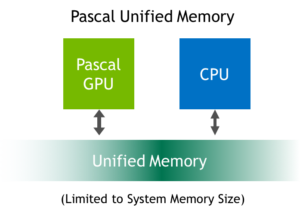
The most impressive feature I found on as advertised is the unified memory support. In CUDA 6 and CC3.0 & CC3.5 devices (Kepler architecture) this term had been first introduced. But it didn't actually provide any real benefits at the time other than programming laziness. In particular, the run-time took care of moving the whole data to/from the GPU memory whenever it was used on either the host or GPU. The GP100 memory unification seems far more complete as according to specifications it seems to take memory unification to the next level. It supports data migration at the granularity of memory page! This means that programmer is able to "see" the whole system memory and the run-time takes care of which memory page should be moved at the time it is actually needed. This is a great feature! It allows porting CPU programs to CUDA without caring which data will actually be accessed.

For instance, imagine having a huge tree or graph structure and and you have a GPU kernel that needs to access just a few nodes on it without knowing which beforehand. Using the Kepler memory unification feature would require copying the whole structure from the host to GPU memory which could potentially cannibalize performance. The Pascal memory unification would actually copy only the memory pages residing on the accessed nodes, instead. This releases programmer from a great pain and that's why I think this is the most exciting feature.

I really hope this feature will be eventually supported on consumer GPU variants and stays not just an HPC feature for in Tesla products. I also hope that AMD will also support such a feature in its emerging ROCm platform.

Resources:

Thursday, May 19, 2016

mixbench on an AMD Fiji GPU

Recently, I had the quite pleasant opportunity to be granted with the Radeon R9 Nano GPU card. This card features the Fiji GPU and as such it seems to be a compute beast as it features 4096 shader units and HBM memory with bandwidth reaching to 512GB/sec. If one considers the card's remarkably small size and low power consumption, this card proves to be a great and efficient compute device for handling parallel compute tasks via OpenCL (or HIP, but more on this on a later post).

AMD R9 Nano GPU card

One of the first experiments I tried on it was the mixbench microbenchmark tool, of course. Expressing the execution results via gnuplot in the memory bandwidth/compute throughput plane is depicted here:

mixbench-ocl-ro as executed on the R9 Nano
GPU performance effectively approaches 8 TeraFlops of single precision compute performance on heavily compute intensive kernels whereas it exceeds 450GB/sec memory bandwidth on memory oriented kernels.

For anyone interested in trying mixbench on their CUDA/OpenCL/HIP GPU please follow the link to github:
https://github.com/ekondis/mixbench

Here is an example of execution on Ubuntu Linux:


Acknowledgement: I would like to greatly thank the Radeon Open Compute department of AMD for kindly supplying the Radeon R9 Nano GPU card for the support of our research.

Saturday, March 19, 2016

Raspberry PI 3 is here!

Some days ago the Raspberry PI 3 arrived home as I had ordered one when I heard of its launch. It's certainly a faster PI than the PI 2 due to the ARM Cortex-A53 cores. More or less the +50% performance ratio is true, depending on the application of course. There are some other additions as well like WiFi and bluetooth.

The Raspberry PI 3

A closer look of the PI 3

As usual, I am providing some nbench execution results. These are consistent with the +50% performance claim. For those interested I had published nbench results on the PI 2 in the past.

BYTEmark* Native Mode Benchmark ver. 2 (10/95)
Index-split by Andrew D. Balsa (11/97)
Linux/Unix* port by Uwe F. Mayer (12/96,11/97)

TEST                : Iterations/sec.  : Old Index   : New Index
                    :                  : Pentium 90* : AMD K6/233*
--------------------:------------------:-------------:------------
NUMERIC SORT        :          654.04  :      16.77  :       5.51
STRING SORT         :          72.459  :      32.38  :       5.01
BITFIELD            :      1.9972e+08  :      34.26  :       7.16
FP EMULATION        :          134.28  :      64.44  :      14.87
FOURIER             :          6677.3  :       7.59  :       4.27
ASSIGNMENT          :          10.381  :      39.50  :      10.25
IDEA                :          2740.7  :      41.92  :      12.45
HUFFMAN             :          1008.9  :      27.98  :       8.93
NEURAL NET          :          9.8057  :      15.75  :       6.63
LU DECOMPOSITION    :          365.38  :      18.93  :      13.67
==========================ORIGINAL BYTEMARK RESULTS==========================
INTEGER INDEX       : 34.272
FLOATING-POINT INDEX: 13.131
Baseline (MSDOS*)   : Pentium* 90, 256 KB L2-cache, Watcom* compiler 10.0
==============================LINUX DATA BELOW===============================
CPU                 : 4 CPU ARMv7 Processor rev 4 (v7l)
L2 Cache            :
OS                  : Linux 4.1.18-v7+
C compiler          : gcc-4.9
libc                : libc-2.19.so
MEMORY INDEX        : 7.162
INTEGER INDEX       : 9.769
FLOATING-POINT INDEX: 7.283
Baseline (LINUX)    : AMD K6/233*, 512 KB L2-cache, gcc 2.7.2.3, libc-5.4.38
* Trademarks are property of their respective holder.

As I crossed some reports on temperature issues of PI 3 I wanted to execute some experiments on power consumption of the PI 3. I used a power meter on which I plugged the power supply unit feeding the PI. I run a few experiments and I got the following power consumption ratings:


PI running statePower consumption
Idle1.4W
Single threaded benchmark2.2W
Multithreaded benchmark4.0W
After running "poweroff"0.5W

So, for my case it doesn't seem consume to much power. However, a comparison with the PI 2 should be performed in order to have a better picture.

Sunday, November 22, 2015

mixbench benchmark OpenCL implementation

Four and a half months ago I posted an article about mixbench benchmark. This benchmark was used to assess performance of an artificial kernel with mixed compute and memory operations which corresponds to various operational intensities (Flops/byte ratios). The implementation was based on CUDA and therefore only NVidia GPUs could be used.

Now, I've ported the CUDA implementation to OpenCL and here I provide some performance numbers on an AMD R7-260X. Here is the output when using 128MB memory buffer:

mixbench-ocl (compute & memory balancing GPU microbenchmark)
Use "-h" argument to see available options
------------------------ Device specifications ------------------------
Device:              Bonaire
Driver version:      1800.11 (VM)
GPU clock rate:      1175 MHz
Total global mem:    1871 MB
Max allowed buffer:  1336 MB
OpenCL version:      OpenCL 2.0 AMD-APP (1800.11)
Total CUs:           14
-----------------------------------------------------------------------
Buffer size: 128MB
Workgroup size: 256
Workitem stride: NDRange
Loading kernel source file...
Precompilation of kernels... [>>>>>>>>>>>>>>>>>>>>>>>>>>>>>>>>>]
--------------------------------------------------- CSV data --------------------------------------------------
Single Precision ops,,,,              Double precision ops,,,,              Integer operations,,,
Flops/byte, ex.time,  GFLOPS, GB/sec, Flops/byte, ex.time,  GFLOPS, GB/sec, Iops/byte, ex.time,   GIOPS, GB/sec
     0.000,  273.95,    0.00,  62.71,      0.000,  519.39,    0.00,  66.15,     0.000,  258.30,    0.00,  66.51
     0.065,  252.12,    4.26,  66.01,      0.032,  506.86,    2.12,  65.67,     0.065,  252.08,    4.26,  66.02
     0.133,  241.49,    8.89,  66.69,      0.067,  487.11,    4.41,  66.13,     0.133,  241.59,    8.89,  66.67
     0.207,  235.72,   13.67,  66.05,      0.103,  474.25,    6.79,  65.66,     0.207,  236.35,   13.63,  65.87
     0.286,  225.46,   19.05,  66.67,      0.143,  453.92,    9.46,  66.23,     0.286,  225.05,   19.08,  66.80
     0.370,  219.59,   24.45,  66.01,      0.185,  442.80,   12.12,  65.47,     0.370,  220.15,   24.39,  65.84
     0.462,  209.03,   30.82,  66.78,      0.231,  421.14,   15.30,  66.29,     0.462,  209.10,   30.81,  66.76
     0.560,  203.60,   36.92,  65.92,      0.280,  409.07,   18.37,  65.62,     0.560,  203.99,   36.85,  65.80
     0.667,  192.80,   44.55,  66.83,      0.333,  388.95,   22.09,  66.26,     0.667,  193.27,   44.44,  66.67
     0.783,  187.81,   51.46,  65.75,      0.391,  378.34,   25.54,  65.27,     0.783,  187.86,   51.44,  65.73
     0.909,  177.09,   60.63,  66.70,      0.455,  357.29,   30.05,  66.12,     0.909,  177.18,   60.60,  66.66
     1.048,  171.62,   68.82,  65.69,      0.524,  345.04,   34.23,  65.35,     1.048,  171.59,   68.83,  65.70
     1.200,  160.76,   80.15,  66.79,      0.600,  325.75,   39.55,  65.92,     1.200,  160.57,   80.24,  66.87
     1.368,  155.33,   89.86,  65.67,      0.684,  313.23,   44.56,  65.13,     1.368,  155.30,   89.88,  65.68
     1.556,  144.48,  104.05,  66.89,      0.778,  293.56,   51.21,  65.84,     1.556,  144.62,  103.95,  66.82
     1.765,  139.33,  115.60,  65.51,      0.882,  281.60,   57.20,  64.82,     1.765,  139.33,  115.60,  65.50
     2.000,  128.79,  133.40,  66.70,      1.000,  261.47,   65.70,  65.70,     2.000,  128.86,  133.32,  66.66
     2.267,  117.57,  155.26,  68.50,      1.133,  235.53,   77.50,  68.38,     2.267,  117.49,  155.36,  68.54
     2.571,  112.96,  171.10,  66.54,      1.286,  246.34,   78.46,  61.02,     2.571,  112.65,  171.57,  66.72
     2.923,  101.62,  200.77,  68.68,      1.462,  257.16,   79.33,  54.28,     2.923,  101.13,  201.72,  69.01
     3.333,   96.64,  222.22,  66.67,      1.667,  268.00,   80.13,  48.08,     3.333,   95.65,  224.51,  67.35
     3.818,   83.93,  268.65,  70.36,      1.909,  278.84,   80.86,  42.36,     3.818,   72.92,  309.24,  80.99
     4.400,   80.58,  293.16,  66.63,      2.200,  289.68,   81.55,  37.07,     4.400,   73.59,  321.00,  72.95
     5.111,   67.67,  364.96,  71.41,      2.556,  300.58,   82.16,  32.15,     5.111,   74.28,  332.49,  65.05
     6.000,   64.45,  399.83,  66.64,      3.000,  311.43,   82.75,  27.58,     6.000,   75.29,  342.26,  57.04
     7.143,   50.01,  536.76,  75.15,      3.571,  322.26,   83.30,  23.32,     7.143,   76.25,  352.04,  49.29
     8.667,   48.34,  577.52,  66.64,      4.333,  333.09,   83.81,  19.34,     8.667,   77.26,  361.33,  41.69
    10.800,   33.47,  866.12,  80.20,      5.400,  343.93,   84.29,  15.61,    10.800,   78.25,  370.48,  34.30
    14.000,   32.22,  932.99,  66.64,      7.000,  354.77,   84.74,  12.11,    14.000,   79.26,  379.32,  27.09
    19.333,   20.68, 1505.69,  77.88,      9.667,  376.91,   82.62,   8.55,    19.333,   80.27,  387.93,  20.07
    30.000,   19.37, 1663.32,  55.44,     15.000,  378.17,   85.18,   5.68,    30.000,   81.26,  396.41,  13.21
    62.000,   18.46, 1802.66,  29.08,     31.000,  389.93,   85.36,   2.75,    62.000,   33.57,  991.64,  15.99
       inf,   16.68, 2059.77,   0.00,        inf,  397.94,   86.34,   0.00,       inf,   33.54, 1024.43,   0.00
---------------------------------------------------------------------------------------------------------------

And here is "memory bandwidth" to "compute throughput" plot on the single precision floating point experiment results:

The source code of mixbench is freely provided, hosted at a github repository and you can find it at https://github.com/ekondis/mixbench. I would be happy to include results from other GPUs as well. Please try this tool and let me know about your extracted results and thoughts.

Monday, November 16, 2015

OpenCL 2.1 and SPIR-V standards released!

I've just noticed that the OpenCL 2.1 and SPIR-V standards were released today!

I just hope that vendors will not take to long to introduce up to date SDKs and drivers.

OpenCL 2.1
SPIR-V

Wednesday, October 28, 2015

OpenCL on the Raspberry PI 2

OpenCL can be enabled on the Raspberry PI 2! However, you'll be disappointed to know that I'm referring to the utilization of its CPU, not GPU. Nevertheless, running OpenCL on the PI could be useful for development and experimentation on an embedded platform.

You'll need the POCL implementation (Portable OpenCL) which relies on the LLVM. I used the just released v0.12 of POCL and the Raspbian Jessie supplied LLVM v.3.5.

After compiling and installing POCL with the natural procedure (you might need to install some libraries from the raspbian repositories, e.g. libhwloc-dev, libclang-dev or mesa-common-dev) you'll be able to compile OpenCL programs on the PI. I tested the clpeak benchmark program but the compute results were rather poor:

Platform: Portable Computing Language
Device: pthread
Driver version : 0.12-pre (Linux ARM)
Compute units : 4
Clock frequency : 900 MHz

Global memory bandwidth (GBPS)
float : 0.85
float2 : 0.87
float4 : 0.76
float8 : 0.75
float16 : 0.81

Single-precision compute (GFLOPS)
float : 0.03
float2 : 0.03
float4 : 0.03
float8 : 0.03
float16 : 0.03

Transfer bandwidth (GBPS)
enqueueWriteBuffer : 0.79
enqueueReadBuffer : 0.69
enqueueMapBuffer(for read) : 12427.57
memcpy from mapped ptr : 0.69
enqueueUnmap(after write) : 18970.70
memcpy to mapped ptr : 0.70

Kernel launch latency : 190270.91 us

In addition, the integer benchmark could not be executed for some reason. However, memory bandwidth result was decent and using a personal benchmark tool I could measure more than 1.4GB/sec memory bandwidth which is really nice for a PI!


Saturday, July 4, 2015

mixbench: A GPU benchmark for mixed compute/transfer bound kernels

I have just released mixbench on github. It is a benchmark tool which assesses performance bounds on GPUs (compute or memory bound) under mixed workloads. Unfortunately, it's currently implemented on CUDA so only NVidia GPUs can be used. The compute part can be SP Flops, DP Flops or Int ops and the memory part is global memory traffic. Running the multiple experiments in a wide range of operational intensity values allows to examine the performance of GPUs under different kernel characteristics.

Running the program under a GTX-480 gives the following output:

mixbench (compute & memory balancing GPU microbenchmark)
------------------------ Device specifications ------------------------
Device:              GeForce GTX 480
CUDA driver version: 5.50
GPU clock rate:      1401 MHz
Memory clock rate:   924 MHz
Memory bus width:    384 bits
WarpSize:            32
L2 cache size:       768 KB
Total global mem:    1535 MB
ECC enabled:         No
Compute Capability:  2.0
Total SPs:           480 (15 MPs x 32 SPs/MP)
Compute throughput:  1344.96 GFlops (theoretical single precision FMAs)
Memory bandwidth:    177.41 GB/sec
-----------------------------------------------------------------------
Total GPU memory 1610285056, free 1195106304
Buffer size: 256MB
Trade-off type:compute with global memory (block strided)
---- EXCEL data ----
Operations ratio ;  Single Precision ops ;;;  Double precision ops ;;;    Integer operations   
  compute/memory ;    Time;  GFLOPS; GB/sec;    Time;  GFLOPS; GB/sec;    Time;   GIOPS; GB/sec
       0/32      ; 240.531;    0.00; 142.85; 475.150;    0.00; 144.63; 240.205;    0.00; 143.04
       1/31      ; 233.548;    9.20; 142.52; 460.193;    4.67; 144.66; 233.484;    9.20; 142.56
       2/30      ; 225.249;   19.07; 143.01; 445.144;    9.65; 144.73; 225.235;   19.07; 143.02
       3/29      ; 218.552;   29.48; 142.48; 430.575;   14.96; 144.64; 218.745;   29.45; 142.35
       4/28      ; 210.345;   40.84; 142.93; 415.425;   20.68; 144.74; 210.091;   40.89; 143.10
       5/27      ; 203.132;   52.86; 142.72; 400.472;   26.81; 144.78; 203.275;   52.82; 142.62
       6/26      ; 194.468;   66.26; 143.56; 385.434;   33.43; 144.86; 194.314;   66.31; 143.67
       7/25      ; 187.470;   80.19; 143.19; 370.915;   40.53; 144.74; 187.475;   80.18; 143.18
       8/24      ; 175.115;   98.11; 147.16; 355.723;   48.30; 144.89; 175.132;   98.10; 147.14
       9/23      ; 171.760;  112.53; 143.78; 341.353;   56.62; 144.70; 171.920;  112.42; 143.65
      10/22      ; 163.397;  131.43; 144.57; 326.007;   65.87; 144.92; 163.252;  131.54; 144.70
      11/21      ; 155.797;  151.62; 144.73; 311.655;   75.80; 144.70; 155.814;  151.61; 144.71
      12/20      ; 146.573;  175.82; 146.51; 296.386;   86.95; 144.91; 146.662;  175.71; 146.42
      13/19      ; 138.853;  201.06; 146.93; 281.757;   99.08; 144.81; 138.941;  200.93; 146.83
      14/18      ; 129.727;  231.75; 148.98; 266.401;  112.86; 145.10; 129.744;  231.72; 148.97
      15/17      ; 121.228;  265.72; 150.57; 251.283;  128.19; 145.28; 121.339;  265.47; 150.43
      16/16      ; 120.065;  286.18; 143.09; 235.740;  145.75; 145.75; 120.122;  286.04; 143.02
      17/15      ; 111.357;  327.84; 144.64; 219.472;  166.34; 146.77; 111.528;  327.34; 144.41
      18/14      ; 106.430;  363.19; 141.24; 231.498;  166.98; 129.87; 106.541;  362.82; 141.10
      19/13      ;  96.118;  424.50; 145.22; 243.534;  167.54; 114.63;  96.494;  422.85; 144.66
      20/12      ;  89.602;  479.34; 143.80; 256.247;  167.61; 100.57;  89.642;  479.13; 143.74
      21/11      ;  81.976;  550.13; 144.08; 269.055;  167.61;  87.80;  83.091;  542.74; 142.15
      22/10      ;  76.066;  621.10; 141.16; 282.898;  167.00;  75.91;  76.068;  621.08; 141.15
      23/ 9      ;  65.631;  752.57; 147.24; 295.743;  167.01;  65.35;  76.895;  642.33; 125.67
      24/ 8      ;  60.809;  847.57; 141.26; 307.479;  167.62;  55.87;  80.099;  643.45; 107.24
      25/ 7      ;  52.032; 1031.82; 144.45; 321.449;  167.02;  46.76;  83.296;  644.53;  90.23
      26/ 6      ;  48.321; 1155.49; 133.33; 334.305;  167.02;  38.54;  86.519;  645.35;  74.46
      27/ 5      ;  49.519; 1170.90; 108.42; 347.157;  167.02;  30.93;  89.729;  646.19;  59.83
      28/ 4      ;  50.704; 1185.90;  84.71; 360.013;  167.02;  23.86;  92.891;  647.31;  46.24
      29/ 3      ;  52.024; 1197.09;  61.92; 372.867;  167.02;  17.28;  96.115;  647.94;  33.51
      30/ 2      ;  53.377; 1206.97;  40.23; 385.722;  167.02;  11.13;  99.328;  648.61;  21.62
      31/ 1      ;  53.437; 1245.80;  20.09; 397.203;  167.60;   5.41; 101.247;  657.52;  10.61
      32/ 0      ;  53.558; 1283.08;   0.00; 410.012;  167.60;   0.00; 102.494;  670.47;   0.00
--------------------

The results for single and double precision Flops are illustrated in the following charts:
% of peak SP Flops and memory bandwidth performance related with the operational intensity
% of peak DP Flops and memory bandwidth performance related with the operational intensity
Compute throughput (SP Flops) vs memory bandwidth

Compute throughput (DP Flops) vs memory bandwidth

Publication:

Since this work was initially part of published research please cite the following publication where applicable:

Konstantinidis, E.; Cotronis, Y., "A Practical Performance Model for Compute and Memory Bound GPU Kernels," Parallel, Distributed and Network-Based Processing (PDP), 2015 23rd Euromicro International Conference on , vol., no., pp.651,658, 4-6 March 2015
doi: 10.1109/PDP.2015.51
URL: http://ieeexplore.ieee.org/stamp/stamp.jsp?tp=&arnumber=7092788&isnumber=7092002

Monday, June 15, 2015

IWOCL 2015 presentations available online


IWOCL 2015 (International Workshop on OpenCL) presentations are available online for free download. It's a good thing that the organizers provide them not long after the conference takes place.


For more info about IWOCL: Link

Sunday, April 19, 2015

About SPIR-V and OpenCL 2.1

Less than a couple of months ago the provisional release of OpenCL 2.1 and SPIR-V byte code was announced. SPIR-V is now defined completely from the ground-up and is not a patched LLVM derivative anymore. The real good news is that Khronos will push extended language features (C++) to be supported through an offline compiler.

Let me explain. I believe that the source compiler should never have been a part of the device driver. Using an offline compiler and feeding the OpenCL runtime with kernels in a bytecode format would allow the runtime to be more lightweight, which is very important especially for mobile devices. It would also prove to be less error prone and more portable. My sense is that OpenCL consumption by the runtime will be obsolete in future OpenCL releases. I always found weird the way by supplying text source code to the library during runtime. This is a change for good and it will allow vendors releasing their implementations faster.

I also want to note that NVidia, after all these years of stagnation, silently released drivers supporting OpenCL 1.2 which allows us dreaming a future driver supporting SPIR-V. They do not support Fermi through (only Kepler & Maxwell).

Tuesday, March 17, 2015

ISA reference guide for Volcanic Islands architecture

A new GPU ISA manual is available for AMD GCN 3rd generation GPUs. This is probably regarding the Tonga GPU and Carrizo APU as it mentions that context switching is an additional capability to the architecture.

You may download it here:

http://amd-dev.wpengine.netdna-cdn.com/wordpress/media/2013/07/AMD_GCN3_Instruction_Set_Architecture.pdf

Saturday, February 28, 2015

Maxwell for the masses (GM206)

As you probably already know the mainstream version of Maxwell GPU has already been released in the form of GM206. The graphics card bearing the chip is the GTX-960. The card seems to be pretty efficient and a significant improvement over Kepler especially in compute applications which is the one aspect that I'm particularly interested in. There has been some controversy of course due to its short memory bus (128bit) which entails a peak memory bandwidth of 112GB/sec. However, the larger cache memory should help alleviating this bottleneck.

The Zotac GTX-960 AMP! edition

In order to give you a taste about the compute capabilities of Maxwell I provide the results of experimenting with the OpenCL NBody example (16384 bodies) from the NVidia SDK 4.2 (the last one with OpenCL support). The GTX-960 yields a well above of 1TeraFlop performance which is impressive. I also performed executions with 3 more GPUs. All results are depicted in the chart that follows.


The red bars represent measured performance in GFLOPs and the green ones the efficiency as the ratio measured/peak GFLOPs performance.
The Maxwell architecture seems to address many issues with compute efficiency of its predecessor. However, there are two drawbacks. First, the low memory bandwidth as mentioned above and second, the quite low compute performance in double precision operations which is set now at 1/32 ratio with regard to single precision operations.
One last observation is the quite good performance of the AMD GPU although the example application had been developed by NVidia and it's reasonable to think that it is optimized for its own GPUs. This could be one of the main reasons that they stopped supporting the OpenCL paradigm.